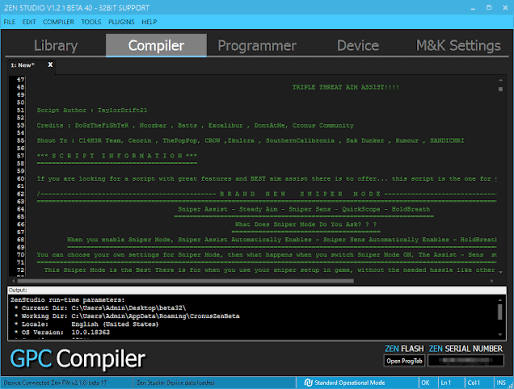
Cronus Zen scripts are a popular topic among gamers who want to customize the way their controllers interact with supported games. A Cronus Zen device can connect a cronus zen scripts controller to a gaming system and provide programmable features that change or automate certain controller inputs. Because scripts can affect gameplay in different ways, it is important to understand what they do, how they are configured, and when their use may be restricted by a game’s rules.
What Are Cronus Zen Scripts?
Cronus Zen scripts are small programs designed to run through a Cronus Zen gaming adapter. They are generally written using the GPC scripting language, which allows users to define controller behaviors and create customized input configurations.
Depending on the script, a configuration may modify button mappings, adjust controller responses, or create predefined input sequences. The device is designed to give players more control over how their physical controller behaves.
Scripts can range from simple remapping configurations to more complicated automation routines. Their functionality depends on the particular script, the game, the controller, and the settings selected by the user.
Why Do Gamers Use Scripts?
One major reason gamers explore Cronus Zen scripts is customization. Different players have different controller preferences, and programmable input configurations can make it easier to create a setup that feels comfortable.
For example, someone may prefer a particular button layout that differs from the default configuration. A programmable controller adapter can provide additional flexibility without requiring the player to purchase a completely different controller.
Scripts can also be useful for accessibility purposes. Players who have difficulty using standard controller layouts may benefit from customized input arrangements that make certain controls easier to operate.
Understanding GPC Scripts
GPC is the scripting language associated with Cronus devices. It provides commands and functions that allow developers to work with controller inputs and create programmed behaviors.
A basic script can monitor controller buttons and respond according to predefined conditions. More advanced scripts can contain multiple functions, variables, timing instructions, and configuration options.
Learning the fundamentals of GPC can help users understand what a script actually does instead of simply installing files from unknown sources. This is particularly useful when troubleshooting unexpected controller behavior.
Common Types of Script Features
Cronus Zen scripts can contain many different types of functionality. Some focus on basic customization, while others are designed around particular gameplay mechanics.
Controller remapping is one straightforward example. A script can allow certain buttons or inputs to perform different actions from their default configuration.
Another category involves input timing. Scripts may process inputs according to programmed timing rules. This can be useful for customization and accessibility, although automated gameplay-related functions may violate the rules of particular games or competitions.
Some configurations also provide adjustable settings. A user may be able to change options through menus or controller combinations rather than editing the entire script manually.
Compatibility Matters
Not every Cronus Zen script works identically across every game or platform. Compatibility can depend on the console, controller, game version, firmware, and configuration.
Before using a script, users should check whether it supports their particular setup. Firmware and software updates can also change how devices communicate with controllers.
A script that worked correctly in one environment may require changes after an update. This is why maintaining the device and checking compatibility information is an important part of using programmable controller equipment.
Game Rules and Fair Play
One of the most important considerations surrounding Cronus Zen scripts is fair play. Some online games and competitive communities prohibit devices or scripts that automate inputs or provide gameplay advantages.
A script that is technically functional may therefore still be inappropriate for a particular game. Players should always review the current rules of the game, tournament, league, or platform before using programmable controller features online.
Using permitted accessibility or remapping functions is different from using automation that gives a player an unfair competitive advantage. Understanding this distinction can help gamers avoid account penalties and maintain fair competition.
Choosing Reliable Scripts
Users should be careful when downloading scripts from unfamiliar websites or communities. A script file can contain complicated code, and copying unknown configurations without understanding them can lead to unexpected controller behavior.
A safer approach is to examine the script before loading it and understand its purpose. Reputable documentation and established gaming communities can be useful sources of information.
Users should also avoid configurations that make unrealistic claims about guaranteeing better performance or eliminating the need for normal gameplay skills. There is no universal script that can automatically solve every gaming situation.
Testing a Script
Testing should be performed carefully. After loading a new configuration, users can first check whether basic controller functions continue working correctly.
If buttons behave unexpectedly, inputs are delayed, or the controller performs actions that were not intended, the script should be reviewed or removed.
Keeping a backup of a known working configuration can also make troubleshooting easier. If a new script causes problems, returning to the previous configuration provides a simple way to identify whether the script was responsible.
Scripts and Accessibility
Programmable controller technology can have legitimate accessibility benefits. Players with different physical needs may find customized controls easier to use than standard controller layouts.
For example, changing button assignments can reduce the need to reach difficult controls or make frequently used functions easier to access. These types of configurations can help make gaming more comfortable without necessarily providing an unfair competitive advantage.
Accessibility-focused configurations should still be checked against individual game rules, particularly in organized competitions.
Maintaining Your Configuration
A well-organized setup can make Cronus Zen scripts easier to manage. Users may want to keep separate configurations for different games and clearly label each one.
It is also helpful to record which firmware and controller setup was used when a configuration worked correctly. This information can make troubleshooting much easier after software or game updates.
Regularly reviewing unused scripts can also reduce confusion. Removing outdated configurations helps ensure that the active setup contains only the features the player actually needs.
Final Thoughts
Cronus Zen scripts provide a programmable approach to controller customization. They can be used for remapping, accessibility improvements, configuration flexibility, and other controller-related functions. At the same time, certain automated gameplay features may conflict with the rules of online games and competitive environments.
For the best experience, users should understand what each script does, verify compatibility, test configurations carefully, and follow the rules of the games they play. Used responsibly, programmable controller technology can provide useful customization while keeping the focus on a reliable and enjoyable gaming setup.