Introduction
Modern workspaces rely on multiple devices to stay productive. Professionals often use laptops, external monitors, keyboards, storage drives, printers, memory cards, and mobile devices simultaneously. Managing all these connections can become frustrating, especially as many modern laptops offer only a limited number of ports. This is where a 15 in 1 docking station becomes an essential accessory.
A 15 in 1 docking station transforms a single USB-C or Thunderbolt connection into a complete workstation. Instead of plugging and unplugging multiple cables throughout the day, users can connect everything through one hub. This not only saves time but also creates a cleaner, more organized desk while improving workflow.
Whether you work from home, in an office, or travel frequently, investing in a 15 in 1 docking station can dramatically simplify multi-device connectivity and boost productivity.
What Is a 15 in 1 Docking Station?
A 15 in 1 docking station is a multifunctional device designed to expand the connectivity options of laptops and compatible computers. It combines numerous ports into one compact unit, allowing users to connect several peripherals simultaneously.
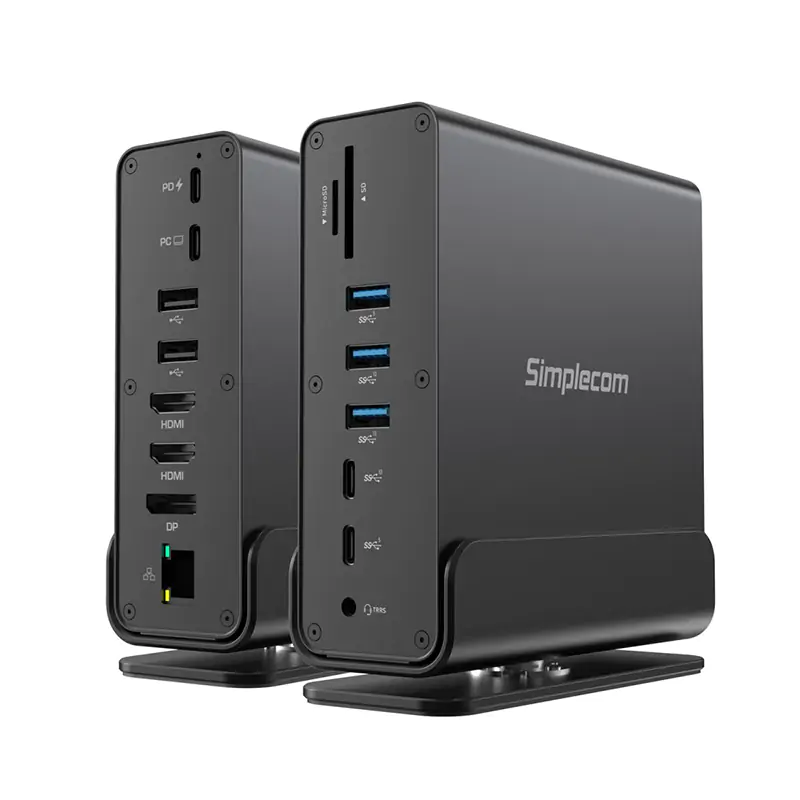
Depending on the model, a 15 in 1 docking station may include:
Multiple USB Ports
These ports allow users to connect keyboards, mice, external hard drives, flash drives, webcams, and other accessories without constantly swapping cables.
HDMI and DisplayPort Outputs
Many docking stations support dual or even triple monitor setups, making multitasking much more efficient.
Ethernet Port
A wired internet connection provides greater stability and faster speeds than many wireless networks.
SD and MicroSD Card Readers
Photographers, videographers, and content creators can quickly transfer files directly from memory cards.
Audio Ports
Dedicated headphone and microphone connections improve communication during online meetings and streaming.
USB-C Power Delivery
Many docking stations also charge laptops while simultaneously transferring data and video through a single cable.
Simplifying Cable Management
One of the biggest advantages of a 15 in 1 docking station is reducing cable clutter.
Instead of having separate cables running from every peripheral to the laptop, users connect everything to the docking station. Only one cable connects the dock to the computer.
This setup offers several benefits:
- Cleaner workspace
- Easier desk organization
- Faster laptop connection
- Reduced wear on laptop ports
- Simpler workstation maintenance
A tidy workspace often contributes to better focus and increased productivity.
Supporting Multiple Displays with Ease
Today’s professionals often require more screen space for multitasking. Designers, programmers, financial analysts, editors, and remote workers benefit from dual or triple monitor setups.
A 15 in 1 docking station makes this process simple by providing multiple video outputs.
Users can:
Extend Their Desktop
Each monitor displays different applications, making multitasking much easier.
Mirror Displays
Presentations become simpler when the same content appears across multiple screens.
Improve Productivity
Working across several displays reduces the need to constantly switch between windows.
With multiple display support, users can comfortably manage emails, spreadsheets, meetings, creative software, and research at the same time.
One Connection for Everything
Modern laptops often feature only one or two USB-C ports. Connecting several accessories individually quickly becomes impossible.
A 15 in 1 docking station solves this limitation by serving as a central connection hub.
With a single cable, users gain access to:
External Storage
Transfer large files quickly using high-speed USB connections.
Wired Network
Maintain stable internet during video conferences or large downloads.
Audio Devices
Connect speakers, microphones, or headphones without additional adapters.
Input Devices
Use full-size keyboards and precision mice for improved comfort.
The convenience of one connection greatly enhances daily workflow.
Ideal for Remote Work
Remote work has become increasingly common, and home offices often require flexible connectivity.
A 15 in 1 docking station allows remote workers to create a professional workstation with minimal effort.
Benefits include:
- Fast laptop docking
- Easy monitor connections
- Reliable wired internet
- Simple printer connectivity
- Convenient charging
- Better workspace organization
Instead of reconnecting multiple accessories every morning, users plug in one cable and begin working immediately.
Perfect for Creative Professionals
Creative professionals frequently connect numerous devices simultaneously.
Photographers may use:
SD Cards
Quick photo imports reduce editing delays.
External SSDs
Large image libraries transfer at high speeds.
Color-Accurate Monitors
Multiple displays improve editing precision.
Similarly, video editors, graphic designers, music producers, and 3D artists benefit from the expanded connectivity offered by a 15 in 1 docking station.
Improving Business Productivity
Businesses often standardize workstations for employees.
A 15 in 1 docking station simplifies this process by providing consistent connectivity regardless of laptop model, provided compatibility is supported.
Employees can quickly connect to:
- Office monitors
- Ethernet networks
- Conference room equipment
- USB accessories
- External storage
- Audio devices
This reduces setup time and allows staff to remain productive throughout the workday.
Convenient for Students
Students frequently switch between classrooms, libraries, dorm rooms, and home study spaces.
A 15 in 1 docking station allows them to create a complete workstation whenever needed.
They can connect:
- External monitors
- USB drives
- Printers
- Keyboards
- Mice
- Speakers
- Charging cables
This flexibility supports research, online learning, presentations, and multimedia projects.
Enhancing Gaming Setups
Gamers also appreciate the versatility of a 15 in 1 docking station.
While gaming performance primarily depends on the computer itself, a docking station simplifies accessory management.
Users can connect:
Gaming Keyboard
Access responsive controls.
Gaming Mouse
Enjoy precision tracking.
External Displays
Expand visual workspace for compatible setups.
Wired Internet
Reduce latency for online gaming.
Headsets
Improve communication during multiplayer sessions.
Keeping all gaming peripherals connected through one hub makes setup much easier.
Faster Device Switching
Many people use one laptop for work and another for personal tasks.
Instead of reconnecting every accessory, a 15 in 1 docking station allows users to disconnect one computer and connect another within seconds.
This convenience is especially valuable for:
- Hybrid workers
- IT professionals
- Shared office environments
- Freelancers
- Consultants
Switching devices becomes significantly more efficient.
Choosing the Right 15 in 1 Docking Station
Not every docking station offers identical features.
Before purchasing a 15 in 1 docking station, consider:
Display Support
Check supported monitor resolutions and the number of displays.
Data Transfer Speed
High-speed USB ports improve file transfer efficiency.
Charging Capability
Power Delivery support allows compatible laptops to charge while connected.
Port Selection
Ensure the available ports match your daily accessories.
Operating System Compatibility
Verify support for Windows, macOS, or other operating systems you use.
Selecting the right docking station ensures maximum performance and compatibility.
Tips for Getting the Most from Your Docking Station
To maximize the benefits of your 15 in 1 docking station, follow a few simple practices.
- Keep firmware updated when available.
- Use high-quality cables for reliable performance.
- Connect high-bandwidth devices to the recommended ports.
- Organize cables using cable management accessories.
- Place the docking station where airflow remains unobstructed to help prevent overheating.
These habits contribute to long-term reliability and consistent performance.
Conclusion
As technology continues to evolve, managing multiple devices efficiently becomes increasingly important. A 15 in 1 docking station provides a practical solution by combining numerous connectivity options into one compact device. From connecting multiple monitors and external storage to wired networking, charging, and audio equipment, it transforms a laptop into a complete workstation with a single cable.
Whether you are a remote worker, business professional, student, creative expert, or gamer, a 15 in 1 docking station helps simplify multi-device connectivity while reducing cable clutter and improving productivity. By centralizing your peripherals into one reliable hub, you can enjoy a cleaner workspace, faster setup times, and a more streamlined computing experience every day.